Enterprises today operate in an environment where complexity is the norm. Factories are packed with connected machines, supply chains can shift overnight, and critical infrastructure runs so tightly that even a few minutes of downtime can translate into massive financial losses. In a setup like this, relying on assumptions or after-the-fact reports simply doesn’t cut it anymore. This is where digital twin software is quickly becoming a core part of enterprise decision-making.
Digital twins create live, data-driven virtual replicas of real-world assets, systems, and processes. These replicas allow enterprises to continuously monitor performance, simulate changes, and spot potential failures before they disrupt operations. It’s no surprise that adoption is accelerating. The global digital twin market reached nearly $18.9 billion in 2025, fueled by enterprises using digital twins to boost operational efficiency, reduce unplanned downtime, and make faster, more confident decisions based on real data, momentum that’s only expected to grow further in 2026.
In this article, we break down the 10 best digital twin software platforms for enterprises in 2026. We focus on tools that go beyond impressive visuals and deliver practical, measurable value at scale. Whether you’re looking to optimize operations, improve asset reliability, or support large-scale digital transformation initiatives, this list will help you identify which platforms are truly worth serious consideration.
Let’s dive in.
Note: This list is based on extensive research and independent evaluations by our team of tech experts. We are committed to helping our audience understand their options and make the best software purchasing decisions. We also believe in transparency, which is why we have covered the selection criteria we have used to curate this list below.
Digital twin software is a platform that creates a live digital version of a real-world asset, system, or process, and keeps it continuously updated using real data.
In simple terms, it lets enterprises see how something is working right now, understand why it’s behaving that way, and predict what’s likely to happen next without touching the actual system.
The ‘twin’ can represent:
- A single machine or piece of equipment
- An entire factory or production line
- A building or infrastructure system
- A supply chain or logistics network
- Even complex environments like power grids or cities
What makes digital twin software different from traditional dashboards or reports is that it doesn’t just show past data. It combines real-time inputs, historical data, and simulation models to act like a living mirror of the physical world.
10 Best Digital Twin Software Comparison – Quick Summary
Here’s our TL;DR of the 10 best digital twin software, covered individually.
| Software | Best For | Features | Pricing |
| Microsoft Azure Digital Twins | Large enterprises building scalable, IoT-driven digital twins within the Azure ecosystem | • Open twin modelling using DTDL• Real-time IoT data ingestion and graph-based relationships• Time-series analytics and event processing• Enterprise-grade security and access control | Pay-as-you-go consumption pricing |
| PTC Thingworx | Industrial and manufacturing organisations adopting Industry 4.0 | • Low-code industrial app development• Real-time asset modelling and monitoring• Built-in analytics and anomaly detection• AR-enabled workflows via Vuforia | Enterprise, quote-based licensing |
| Schneider Electric EcoStruxure Platform | Enterprises managing critical infrastructure, energy, and automation systems | • Physics-based electrical digital twins (ETAP)• Unified IT/OT data integration• AI-driven energy and asset optimisation• Edge-to-cloud architecture | Enterprise, quote-based pricing.42-days free trial available. |
| GE Digital Twin | Asset-intensive industries requiring predictive maintenance at scale | • 350+ pre-built industrial asset twins• Hybrid physics and AI models• Asset Performance Management (APM)• Edge-to-cloud analytics | Enterprise, quote-based pricing |
| Siemens Digital Twin | Engineering-led enterprises unifying design, manufacturing, and operations | • End-to-end digital thread (design → production → performance)• High-fidelity multi-physics simulation• Virtual commissioning and closed-loop optimisation• Industrial IoT at scale | Enterprise, quote-based pricing |
| Ansys Twin Builder | Engineering teams requiring high-accuracy, physics-based digital twins | • Reduced-order physics models for real-time twins• Multi-domain system simulation• Predictive maintenance via fault simulation• Edge and embedded deployment | Enterprise, quote-based licensingFree trials available. |
| Autodesk bim 360 | Building owners and operators managing complex facilities and campuses | • Seamless BIM-to-operations handover• 3D asset and space visualisation• Structured asset registers and FM context• Cloud-based collaboration | Subscription-based (Autodesk Construction Cloud user/project licensing). |
| Bentley iTwin Platform | Infrastructure owners managing large-scale civil and utility assets | • Infrastructure-scale geospatial digital twins• BIM, GIS, and reality data federation• 4D/5D insights for lifecycle management• Open APIs for custom twin apps |
|
| Aveva CONNECT Platform | Industrial enterprises unifying engineering data with live operations | • Native fusion of PI System data with engineering models• Real-time operational visibility in 3D context• Predictive analytics and optimisation• Cloud collaboration at scale | Enterprise, quote-based subscriptions |
| C3.ai Digital Transformation Platform | Large enterprises building AI-driven digital twins at enterprise scale | • Model-driven digital twin architecture• Enterprise-scale AI and ML lifecycle management• Unified IT and OT data federation• Real-time streaming analytics | Enterprise subscription-based pricing |
Selection Criteria for Choosing the Right Digital Twin Software for Your Organisation
Choosing the best digital twin software platforms for enterprises in 2026 required more than feature comparisons. We evaluated each solution using enterprise-focused, real-world criteria to identify platforms that actually work at scale in complex operational environments. These were the factors behind our selection:
- Ease of Adoption and Usability: We prioritised platforms that are intuitive to use and don’t require teams to start from scratch. The best tools strike a balance. They are easy enough for operations teams to adopt, yet powerful enough for advanced engineering and analytics use cases.
- Depth of Digital Twin Capabilities: Not all tools offer true digital twins. We focused on platforms that support real-time data syncing, system behaviour modelling, and scenario simulations, rather than static visualisations or basic monitoring.
- Integration with Enterprise Systems: Seamless integration with existing infrastructure, such as IoT platforms, ERP systems, cloud services, and data pipelines was a key factor. Enterprises need digital twins that fit into their current tech stack, not operate in silos.
- Scalability and Performance: We assessed how well each platform scales across assets, facilities, or regions, and whether it can handle high data volumes and complex environments without performance bottlenecks.
- Analytics, Intelligence, and Insights: Strong analytics, predictive capabilities, and actionable insights were prioritised over raw data display. The most valuable tools help teams understand risks, trends, and outcomes.
- Security and Enterprise Readiness: Finally, we considered enterprise-grade security, governance, and deployment flexibility, including cloud, on-premise, and hybrid options, critical for regulated industries and large organisations.
Using these criteria, we shortlisted tools that offer real operational value, reliability, and long-term viability for enterprise digital transformation initiatives.
10 Best Digital Twin Software Reviews
In this section, we break down the top 10 digital twin software, reviewing each in detail.
Microsoft Azure Digital Twins
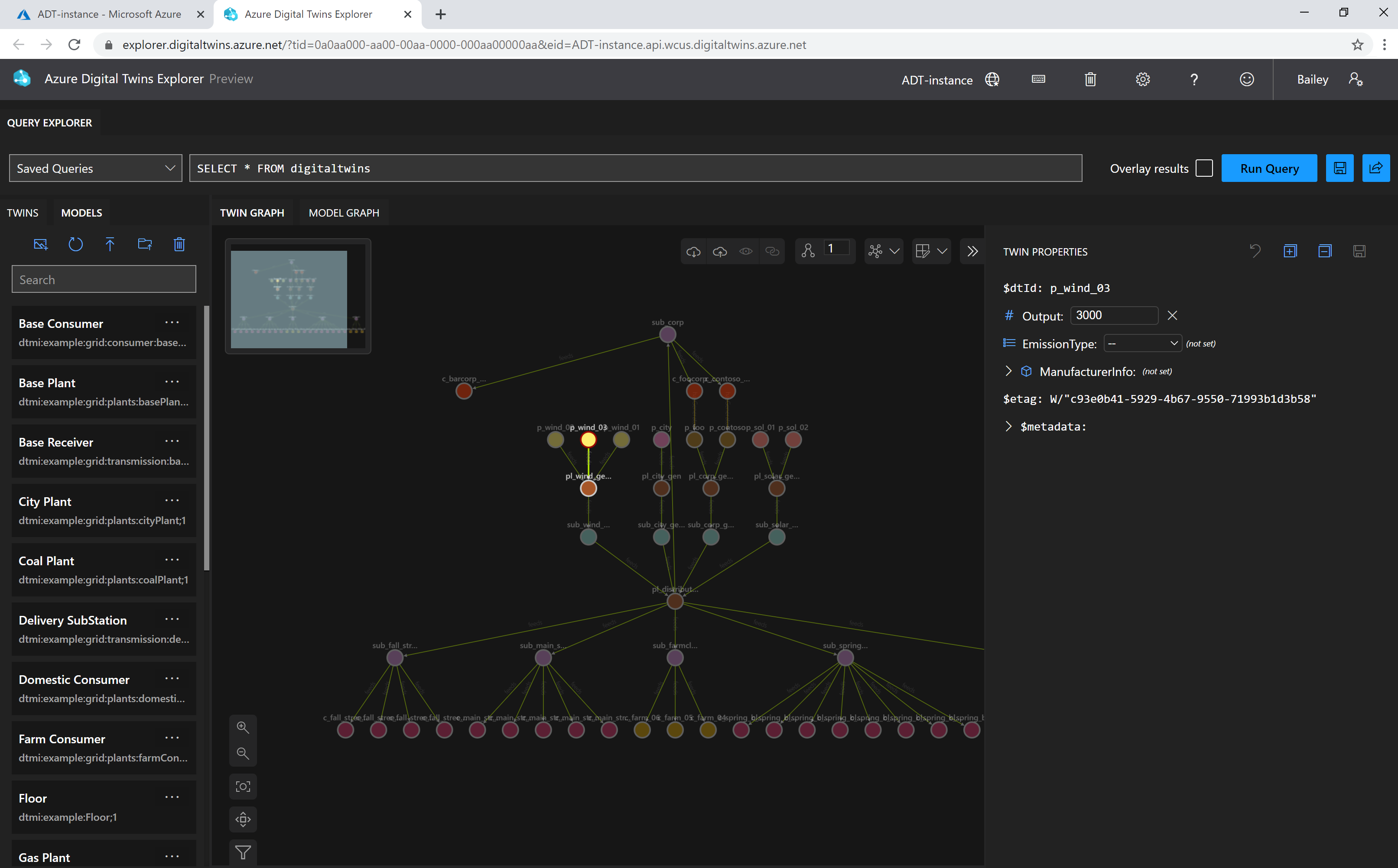
Azure Digital Twins is a fully managed PaaS from Microsoft for creating live digital models of physical environments such as factories, buildings, energy systems, and cities. It connects IoT and business data to help enterprises monitor operations, simulate scenarios, and optimize performance in real time.
One standout feature is its open twin modeling with real-time graph updates. Azure uses the Digital Twins Definition Language (DTDL) to model complex relationships between assets, spaces, and devices. These models stay continuously updated with live IoT data via Azure IoT Hub, enabling real-time monitoring, anomaly detection, and impact analysis.
Other features include advanced querying over twin graphs, live IoT data ingestion, time-series analytics, 3D visualization via Azure 3D Scenes Studio, enterprise-grade security, and deep integration with Azure analytics, AI, and automation services.
Integrations: Azure IoT Hub, IoT Edge, Azure Functions, Event Grid, Logic Apps, Azure Data Explorer, Time Series Insights, Synapse Analytics, Azure ML, Power BI, REST APIs, and SDKs.
Who is it Suitable for: It is suitable for large enterprises using the Microsoft Azure ecosystem. Ideal for smart buildings, manufacturing, energy, utilities, and smart city use cases that require large-scale IoT data modeling with strong security and scalability.
Pricing: Pay-as-you-go consumption pricing based on operations, messages, and query units.
Deployment Options: Cloud-only SaaS on Microsoft Azure, with hybrid support via Azure IoT Edge for on-site data processing.
Pros and Cons:
| Pros | Cons |
|
|
PTC Thingworx
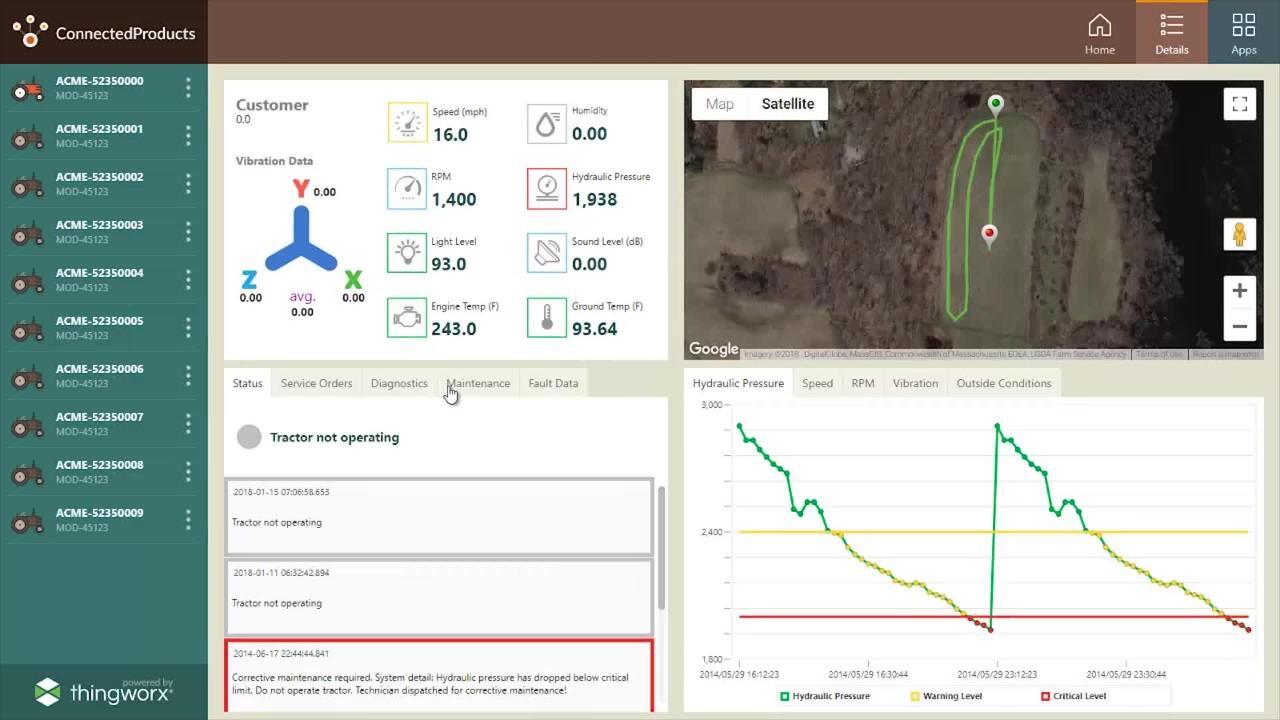
PTC ThingWorx is an industrial IoT and digital twin platform built for manufacturing and asset-intensive environments. It helps enterprises connect machines, model industrial assets, and build real-time monitoring, analytics, and AR-enabled applications for operations, maintenance, and Industry 4.0 initiatives.
One standout feature is its low-code industrial application development. ThingWorx provides a model-driven, low-code environment that allows engineers to rapidly build dashboards, HMIs, and IoT apps using drag-and-drop components. This enables faster deployment of digital twin solutions, often in weeks rather than months without heavy software development.
Other features include real-time IoT data ingestion, unified asset modeling, built-in analytics and anomaly detection, augmented reality experiences via Vuforia, extension marketplace, and strong support for legacy industrial systems and protocols.
Integrations: Kepware (OPC UA, PLCs, Modbus), PTC Vuforia AR Suite, PTC Creo and Windchill (CAD/PLM), SAP and other ERP systems, ServiceNow, Azure IoT Hub, AWS IoT Core, REST APIs, BI and analytics tools.Who is it Suitable for: It is best suited for industrial and manufacturing enterprises adopting Industry 4.0. Ideal for factories, OEMs, asset-heavy operations, and engineering teams that need real-time visibility, predictive maintenance, and AR-enabled workflows. Works especially well for organizations already using PTC’s CAD and PLM tools.
Pricing: Enterprise, quote-based licensing. Pricing depends on devices, users, modules (Analytics, Kepware, Vuforia), and deployment scale.
Deployment Options: Flexible deployment across on-premises, cloud (PTC-hosted, Azure, AWS), or hybrid architectures. Supports edge deployments for local data processing and offline operation.
Pros and Cons:
| Pros | Cons |
|
|
Schneider Electric EcoStruxure Platform
EcoStruxure is Schneider Electric’s IoT-enabled digital twin platform for energy, industrial automation, data centers, and smart buildings. It connects real-time operational data with engineering models and analytics to help enterprises improve reliability, efficiency, and sustainability across critical infrastructure.
One standout feature is its physics-based electrical digital twins for power systems. Through deep integration with ETAP, EcoStruxure creates living digital twins of electrical networks that run real-time power flow and contingency simulations. This allows utilities and facility operators to predict outages, test switching scenarios, and validate protection settings before issues occur.
Other features include unified IT/OT data integration, AI-driven analytics for asset health and energy optimization, 3D facility visualization, AR-enabled maintenance support, open standards-based connectivity, and edge-to-cloud architecture for real-time control and enterprise analytics.
Integrations: ETAP power simulation, Aveva (PI System, Unified Engineering, APM), building management systems (BACnet, Modbus), SAP PM and IBM Maximo, NVIDIA Omniverse, EV charging and microgrids, Microsoft Azure IoT, REST APIs, Power BI, and analytics tools.
Who is it Suitable for: It is suitable for enterprises managing critical physical infrastructure, such as utilities, energy providers, manufacturers, data centers, hospitals, campuses, and large commercial buildings. Ideal for organizations already using Schneider Electric or Aveva solutions.
Pricing: Enterprise, quote-based pricing. Costs depend on assets monitored, advisor apps used, hardware, and deployment scale.
Deployment Options: Hybrid by design; supports on-premises edge control, private cloud, and cloud analytics via EcoStruxure Cloud (Azure-based). Can run fully on-prem for regulated or air-gapped environments, with optional cloud extensions.
Pros and Cons:
| Pros | Cons |
|
|
GE Digital Twin
GE Digital Twin, developed by GE Digital (now under GE Vernova), is an industrial digital twin platform focused on asset performance management, predictive maintenance, and operations optimization. It is widely used across energy, utilities, aviation, oil and gas, and heavy manufacturing to improve reliability and reduce downtime of critical assets.
One standout feature is its pre-built industrial asset twins with proven AI models. GE offers 350+ ready-made digital twin models for turbines, generators, compressors, transformers, and other heavy equipment. These twins come pre-trained using decades of fleet data and physics-based models, enabling fast deployment and highly accurate failure prediction without starting from scratch.
Other features include hybrid physics-based and AI-driven modeling, deep Asset Performance Management (APM) integration, grid-level digital twins for utilities, 3D asset visualization, industrial IoT data ingestion, and edge-to-cloud analytics for real-time monitoring and optimization.
Integrations: GE Proficy Historian and Operations Hub, SAP, Oracle, IBM Maximo, GE Mark VIe and SCADA systems (iFIX, CIMPLICITY), AWS and Azure, REST APIs, OPC UA, MQTT, data science tools (Python, MATLAB), and third-party IoT sensors.
Who is it Suitable for: It is suitable for asset-intensive industries such as power generation, utilities, oil and gas, aviation, renewables, and heavy manufacturing. Ideal for enterprises operating critical equipment where uptime, safety, and performance optimization are top priorities, especially those already using GE equipment or software.
Pricing: Enterprise, quote-based pricing, typically structured per asset or fleet under monitoring.
Deployment Options: Flexible deployment across cloud (AWS, Azure), on-premises, or hybrid architectures. Supports edge computing for local analytics and real-time decisioning, with containerized deployments for enterprise scalability.
Pros and Cons:
| Pros | Cons |
|
|
Siemens Digital Twin
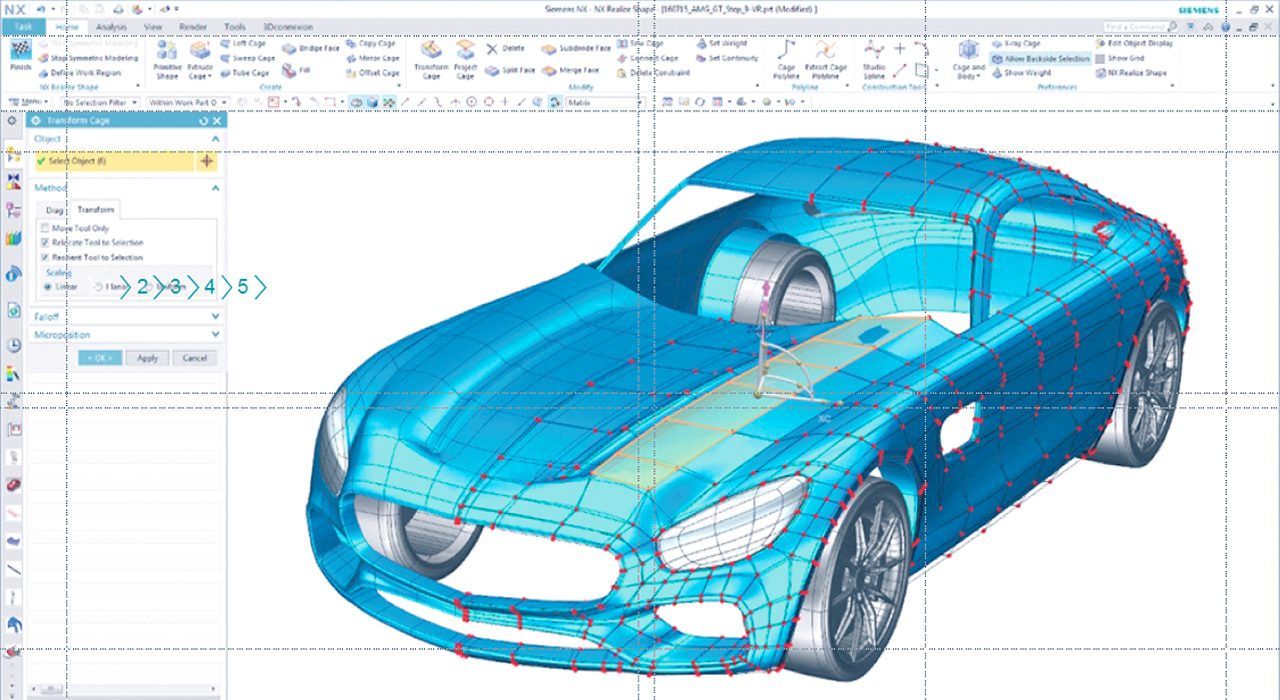
Siemens Digital Twin is a comprehensive, lifecycle-based digital twin suite under the Siemens Xcelerator portfolio. It connects product design, manufacturing, and real-world operations to create digital twins of products, production systems, and performance, enabling enterprises to design, simulate, manufacture, and optimize assets end to end.
One standout feature is its end-to-end digital thread across the full lifecycle. Siemens uniquely links PLM (Teamcenter), CAD/CAE (NX, Simcenter), manufacturing (Tecnomatix, Opcenter), and IoT (MindSphere) into a single digital thread. This allows real-world operational data to feed directly back into design and simulation, enabling continuous product and process improvement.
Other features include high-fidelity multi-physics simulation, industrial IoT connectivity at scale, virtual commissioning of automation systems, closed-loop optimization between engineering and operations, and strong support for open standards and hybrid deployments.
Integrations: Teamcenter PLM, NX and Solid Edge CAD, Simcenter (CAE), Tecnomatix and Opcenter (manufacturing/MES), MindSphere and Industrial Edge, Siemens PLCs and WinCC SCADA, SAP ERP/MES, OPC UA, FMI, REST APIs, AWS and Azure, Bentley (infrastructure), third-party CAD and IoT systems.
Who is it Suitable for: It is suitable for engineering-driven manufacturers and enterprises that want to unify R&D, production, and field operations. Ideal for automotive, aerospace, industrial machinery, electronics, heavy equipment, and complex infrastructure projects, especially organizations already using Siemens PLM or automation tools.
Pricing: Enterprise, quote-based pricing across multiple components (PLM, CAD/CAE, MES, IoT).
Deployment Options: Supports cloud, on-premises, and hybrid deployments. Options include Teamcenter X (cloud PLM), MindSphere cloud or private editions, on-prem PLM and simulation, and edge computing on the shop floor. Designed for flexible, customer-chosen architectures.
Pros and Cons:
| Pros | Cons |
|
|
Ansys Twin Builder
Ansys Twin Builder is a simulation-driven digital twin platform focused on high-fidelity, physics-based modeling of complex assets and systems. Built by Ansys, it enables engineers to create accurate digital twins that predict real-world behavior using reduced-order models derived from detailed CAE simulations.
One standout feature is its real-time reduced-order physics models (ROMs). Twin Builder converts detailed 3D simulations (FEA, CFD, thermal, etc.) into lightweight reduced-order models that retain core physics but can run in real time. This allows digital twins to deliver highly accurate predictions, such as remaining useful life or thermal response without supercomputing resources.
Other features include multi-domain system modeling (mechanical, electrical, fluid, controls), real-time co-simulation with live sensor data, synthetic fault simulation for predictive maintenance, edge and embedded deployment, and tight linkage to Ansys’ flagship simulation solvers.
Integrations: Ansys Mechanical, Fluent, HFSS; Modelica libraries; OPC UA and industrial data sources; PLM and CAD systems; Python and FMU workflows; MATLAB/Simulink; PTC ThingWorx and Azure IoT (via APIs); optiSLang for optimization; C/C++ export for embedded controllers.
Who is it Suitable for: It is suitable for engineering-led organizations operating high-value, complex assets where physics accuracy is critical, such as aerospace, automotive, defense, energy, heavy machinery, and advanced manufacturing. Ideal for teams already using Ansys CAE tools who want to extend simulation fidelity into operations and predictive maintenance.
Pricing: Enterprise, quote-based licensing aligned with Ansys’ traditional model (annual subscription or perpetual license with maintenance).
Deployment Options: Flexible deployment across engineer workstations, on-prem servers, edge devices, and cloud environments. Twin models can be embedded into controllers, deployed on industrial gateways, or run centrally in cloud or hybrid architectures.
Pros and Cons:
| Pros | Cons |
|
|
Autodesk BIM 360 + Autodesk Tandem (Building Digital Twin)
Autodesk BIM 360 (within Autodesk Construction Cloud) supports BIM collaboration during design and construction, while Autodesk Tandem extends that data into operations by turning the final BIM deliverables into a building digital twin. Together, they help owners manage building assets, spaces, and systems with a single, data-rich 3D model instead of scattered documents.
One standout feature is its seamless handover from BIM to operations (single pane of glass). Tandem converts construction-phase BIM and commissioning data into an operational twin where every asset (HVAC, electrical, rooms, equipment) is mapped with location, specs, warranty, and maintenance context, so facility teams can click an asset in 3D and instantly access documentation, history, and (optionally) live performance data.
Other features include 3D spatial navigation of floors/rooms/equipment, structured asset registers, issue tracking and workflows (RFIs, checklists), maintenance context for FM teams, IoT/BMS data overlay via connectors/APIs, and extensibility through Autodesk Forge for custom apps and integrations.
Integrations: Revit, Navisworks, AutoCAD; Autodesk Construction Cloud (Docs/Build); Building Management Systems via partners/APIs (BACnet-based ecosystems like Schneider, Siemens, Johnson Controls); CMMS/IWMS tools (e.g., Maximo/Archibus via connectors); Azure/AWS IoT via APIs; Forge/ACC Connect integrations; Power BI/Tableau; mobile/field apps and AR viewers.
Who is it Suitable for: It is suitable for building owners and operators responsible for complex, asset-intensive environments such as commercial real estate portfolios, corporate campuses, hospitals, universities, data centers, airports, and large industrial facilities, particularly where high-quality BIM data is available from new builds or major renovations. It is also highly valuable for AEC firms offering digital twin handover as a premium, long-term asset management deliverable.
Pricing: Subscription-based (Autodesk Construction Cloud user/project licensing). Tandem pricing is typically bundled/quote-based as it matures and may vary by building/project scale and usage.
Deployment Options: Cloud SaaS (Autodesk Construction Cloud / Forge-backed).
Pros and Cons:
| Pros | Cons |
|
|
Bentley iTwin Platform
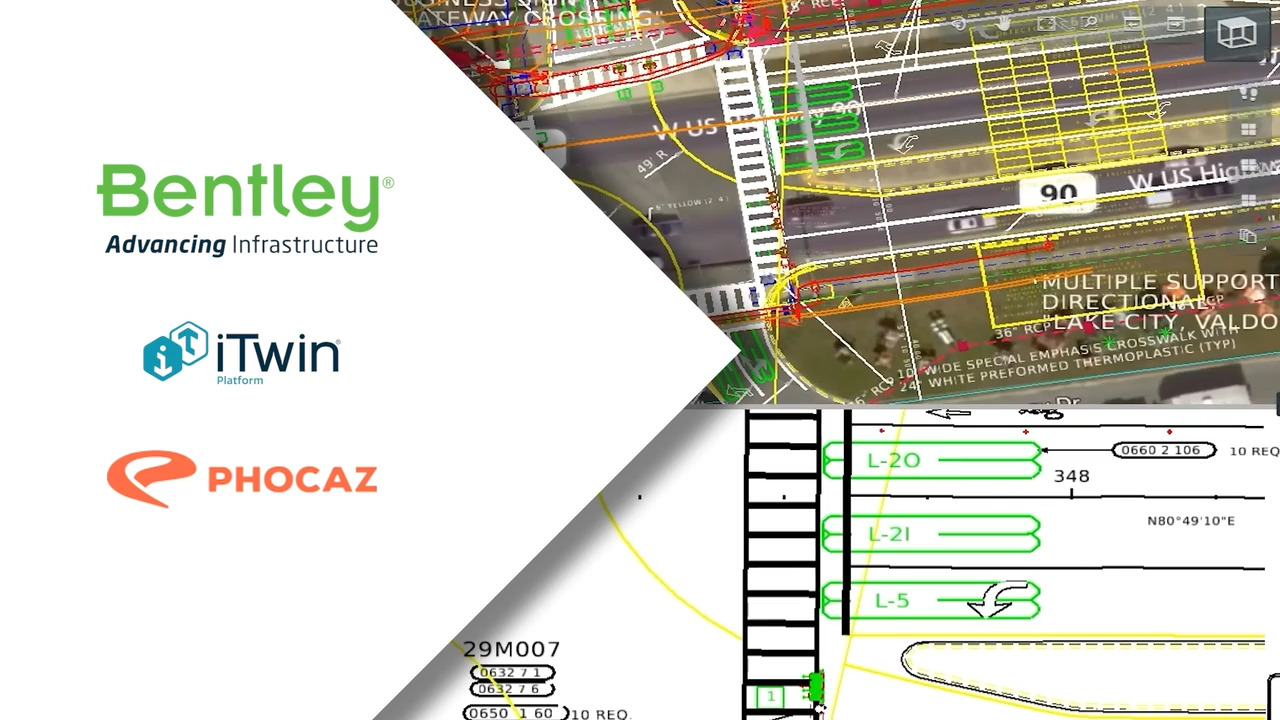
Bentley iTwin Platform is a cloud-based digital twin platform purpose-built for large-scale infrastructure such as roads, bridges, rail networks, utilities, plants, and campuses. Developed by Bentley Systems, it federates BIM/CAD models, GIS data, reality capture (point clouds, meshes), and time-series/IoT data into a single, geospatially accurate digital twin across the asset lifecycle.
One standout feature is its infrastructure-scale, geospatial digital twins with massive data federation. iTwin excels at combining huge BIM datasets, GIS layers, and reality meshes into one immersive, web-based view, supporting 4D (time) and 5D (cost) insights. This enables owners to compare design vs. as-built vs. as-operated states, replay construction progress, and plan future works across entire networks or cities.
Other features include native BIM–GIS–reality data integration, live change synchronization and versioning, analytical insights (structural, flood, and scenario analysis), collaborative web-based reviews with issue tracking, and open APIs for building custom twin applications.
Integrations: Bentley design tools (MicroStation, OpenRoads, OpenRail, OpenPlant, OpenBuildings), ProjectWise, SYNCHRO (4D scheduling), AssetWise, Esri ArcGIS, Autodesk Revit/Civil 3D, SAP and IBM Maximo, Azure IoT and OSIsoft PI, Cesium/3D Tiles, Power BI, and custom apps via itwin.js APIs.
Who is it Suitable for: It is suitable for infrastructure owners, operators, and EPCs overseeing large-scale civil and industrial assets, such as transport authorities, utilities, municipal and city governments, rail operators, and major engineering firms.
Pricing: The pricing plans include:
- Community: Free
- Standard: $199/month
- Premium: $499/month
- Enterprise: Custom
Deployment Options: Primarily cloud-native via Bentley Infrastructure Cloud (Azure-hosted). Supports regional hosting for data sovereignty and hybrid data integration via connectors.
Pros and Cons:
| Pros | Cons |
|
|
Aveva CONNECT Platform
AVEVA Connect is the cloud platform from AVEVA that unifies engineering, operations, and performance data into an industrial digital twin. It brings together 3D design and P&IDs, real-time process data from the PI System, and maintenance/enterprise context to create a living twin of large industrial facilities such as refineries, power plants, mines, and chemical sites.
One standout feature is its native fusion of PI System real-time data with engineering models. AVEVA tightly links PI tags to assets in 3D models and P&IDs, so users can click any piece of equipment and instantly see live values, historical trends, and AI insights in context, eliminating time-consuming cross-referencing and making the twin a true single source of truth.
Other features include unified asset information modeling across 1D/2D/3D, predictive analytics and AI for reliability and optimization, rich cloud visualization and collaboration, edge-to-cloud data buffering for remote sites, and the ability to embed process simulations for what-if analysis.
Integrations: AVEVA E3D, Diagrams, Electrical and Instrumentation; AVEVA PI System (AF, Historian); SAP PM and IBM Maximo; AVEVA Insight and Workflow; Azure services and external IoT platforms via APIs; ETAP for electrical modeling; OPC UA and legacy control systems; Power BI and enterprise analytics.
Who is it Suitable for: It is suitable for large, asset-intensive industrial enterprises, like oil and gas, petrochemicals, power generation, mining, chemicals, water utilities where unifying engineering data with live operations is critical. Especially strong for organizations already using AVEVA or Schneider ecosystems (PI, E3D).
Pricing: Enterprise, quote-based subscriptions typically tied to assets, data volumes (tags/streams), sites, and analytics modules.
Deployment Options: Cloud-first SaaS hosted on Azure with hybrid support. On-site PI/edge components buffer and sync data to the cloud twin; private cloud options exist for sensitive environments. Designed for global, multi-site rollouts.
Pros and Cons:
| Pros | Cons |
|
|
C3.ai Digital Transformation Platform (Enterprise AI Suite)
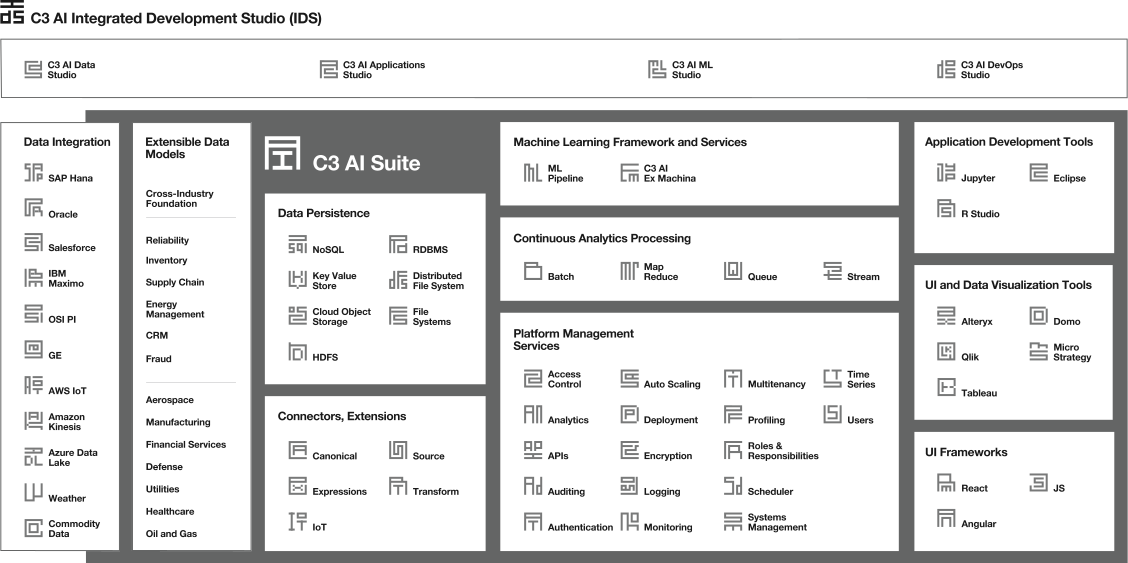
C3.ai Digital Transformation Platform is an enterprise AI and IoT platform that enables organizations to build, deploy, and scale AI-driven applications, including AI-powered digital twins, across large and complex operations. It unifies data from enterprise systems and IoT sources into a single, object-oriented data model and applies machine learning to monitor, predict, and optimize assets, processes, and business entities in real time.
One standout feature is its model-driven digital twin architecture for rapid enterprise-scale AI deployment. C3.ai allows organizations to define digital twin objects (such as turbines, transformers, aircraft, customers, or supply chains) using a high-level metadata model. The platform automatically generates data pipelines, APIs, and AI workflows on top of these models, drastically reducing custom engineering effort. Combined with pre-built AI templates for use cases like predictive maintenance, demand forecasting, and anomaly detection, enterprises can move from siloed data to production-grade AI twins in months rather than years.
Other features include unified data federation across IT and OT systems, automated machine learning lifecycle management (training, deployment, retraining), real-time streaming analytics, enterprise-scale AI orchestration, role-based AI applications, edge AI deployment, and built-in governance, security, and audit controls.
Integrations: Enterprise systems (SAP, Oracle, Salesforce, Microsoft Dynamics), IoT platforms and historians (OSIsoft PI, SCADA via OPC UA, AWS IoT, Azure IoT), data platforms (SQL databases, Hadoop, Spark, Snowflake), AI frameworks (TensorFlow, PyTorch, Jupyter), cloud services (AWS, Azure, GCP), BI tools (Power BI, Tableau), DevOps and CI/CD pipelines, and edge computing frameworks (Kubernetes, Docker).
Who is it Suitable for: It is suitable for large enterprises and government organizations with highly complex, data-rich operations. Ideal for aerospace and defense, utilities, oil and gas, manufacturing, financial services, and large-scale infrastructure where AI-driven digital twins and predictive analytics are central to decision-making.
Pricing: Enterprise subscription-based pricing.
Deployment Options: Flexible deployment across public cloud (AWS, Azure, GCP), private cloud, hybrid, or fully on-premises environments.
Pros and Cons:
| Pros | Cons |
|
|
Digital Twin Software Implementation Tips for Enterprises
Regardless of the digital twin platform you choose, successful implementation depends on how well it is aligned with your organisation’s operational goals, data strategy, and teams. To help enterprises get measurable value from digital twin initiatives, here are some practical implementation tips to follow:
- Define Clear Business Objectives First: Start by identifying what you want to achieve, whether it’s reducing downtime, improving asset performance, optimising energy usage, or enabling predictive maintenance. Clear goals help prevent digital twins from becoming experimental projects with no tangible ROI.
- Start with High-Impact Use Cases: Avoid modelling everything at once. Begin with critical assets, processes, or systems where failures are costly or visibility is limited. Early wins help build internal confidence and justify scaling the initiative.
- Ensure Data Readiness and Quality: Digital twins rely heavily on accurate, real-time data from sensors, IoT devices, and enterprise systems. Validate data sources, standardise formats, and address gaps before building complex models.
- Integrate with Existing Enterprise Systems: Connect your digital twin platform with ERP, IoT platforms, asset management tools, and analytics systems. Seamless integration ensures insights flow into day-to-day operations rather than remaining isolated dashboards.
- Plan for Scalability from Day One: Design the digital twin architecture to support future expansion, across assets, facilities, or regions. Platforms that scale poorly often create performance bottlenecks as adoption grows.
- Encourage Cross-Functional Collaboration: Digital twins are most effective when IT, operations, engineering, and leadership teams work from a shared view of data and simulations. Define clear ownership and collaboration workflows early on.
- Continuously Monitor, Refine, and Optimise: A digital twin is not a one-time setup. Regularly update models, refine assumptions, and incorporate new data to ensure the twin remains accurate and relevant as business conditions evolve.
Conclusion
As enterprises head into 2026, one thing is clear: operations are only getting more complex. Assets are more connected, systems are more distributed, and the cost of downtime, inefficiency, or poor decisions is higher than ever. In this environment, digital twin software is no longer a nice-to-have innovation, it’s becoming a practical tool for running large-scale operations with confidence.
What makes digital twins especially powerful is how quickly they’re evolving. We’re moving towards AI-driven, predictive digital twins that don’t just show what’s happening, but help teams understand what’s likely to happen next, and what they should do about it. Real-time digital twins at enterprise scale are making it possible to monitor and optimize thousands of assets simultaneously, while energy-focused digital twins are playing a growing role in cost control and sustainability initiatives. At the same time, emerging technologies like immersive, metaverse-style interfaces and edge computing are making digital twins faster, more interactive, and better suited for time-critical environments.
For large enterprises, the real value of investing in digital twin software lies in better decisions, fewer surprises, and greater operational resilience. The platforms covered in this guide represent some of the most mature and enterprise-ready options available in 2026, helping organisations shift from reactive firefighting to proactive, data-driven optimisation. Choosing the right digital twin platform today isn’t just about improving performance now; it’s about building smarter, more adaptable operations for the years ahead.
Frequently Asked Questions (FAQs)
How do digital twins integrate with existing enterprise systems?
Digital twins integrate with existing enterprise systems by connecting to data sources such as IoT platforms, ERP systems, asset management tools, and analytics platforms through APIs and data pipelines. This allows real-time and historical data to flow into the digital twin, ensuring models stay updated and aligned with day-to-day operations rather than operating in isolation.
What are the main components of an enterprise digital twin platform?
An enterprise digital twin platform typically includes data ingestion layers, a digital model or simulation engine, analytics and AI capabilities, and visualisation tools. Together, these components collect real-time data, model system behaviour, generate insights or predictions, and present information in a way that supports operational and strategic decision-making.
Can digital twin software handle real-time simulation and analytics at scale?
Yes, enterprise-grade digital twin software is designed to handle real-time simulation and analytics at scale by processing continuous data streams from multiple assets and systems. Using cloud infrastructure, edge computing, and scalable analytics engines, these platforms can support thousands of assets while delivering timely insights for operational decisions.
How do digital twin platforms support predictive maintenance?
Digital twin platforms support predictive maintenance by continuously analysing real-time and historical data from equipment to identify early signs of wear, performance degradation, or abnormal behaviour. This helps teams predict failures in advance, schedule maintenance proactively, and reduce unplanned downtime and repair costs.
Can digital twins integrate with AI and machine learning technologies?
Yes, digital twins can integrate closely with AI and machine learning technologies to enhance prediction, optimisation, and automation. AI models analyse patterns in real-time and historical data, enabling digital twins to forecast outcomes, recommend actions, and continuously improve accuracy as more data is collected.